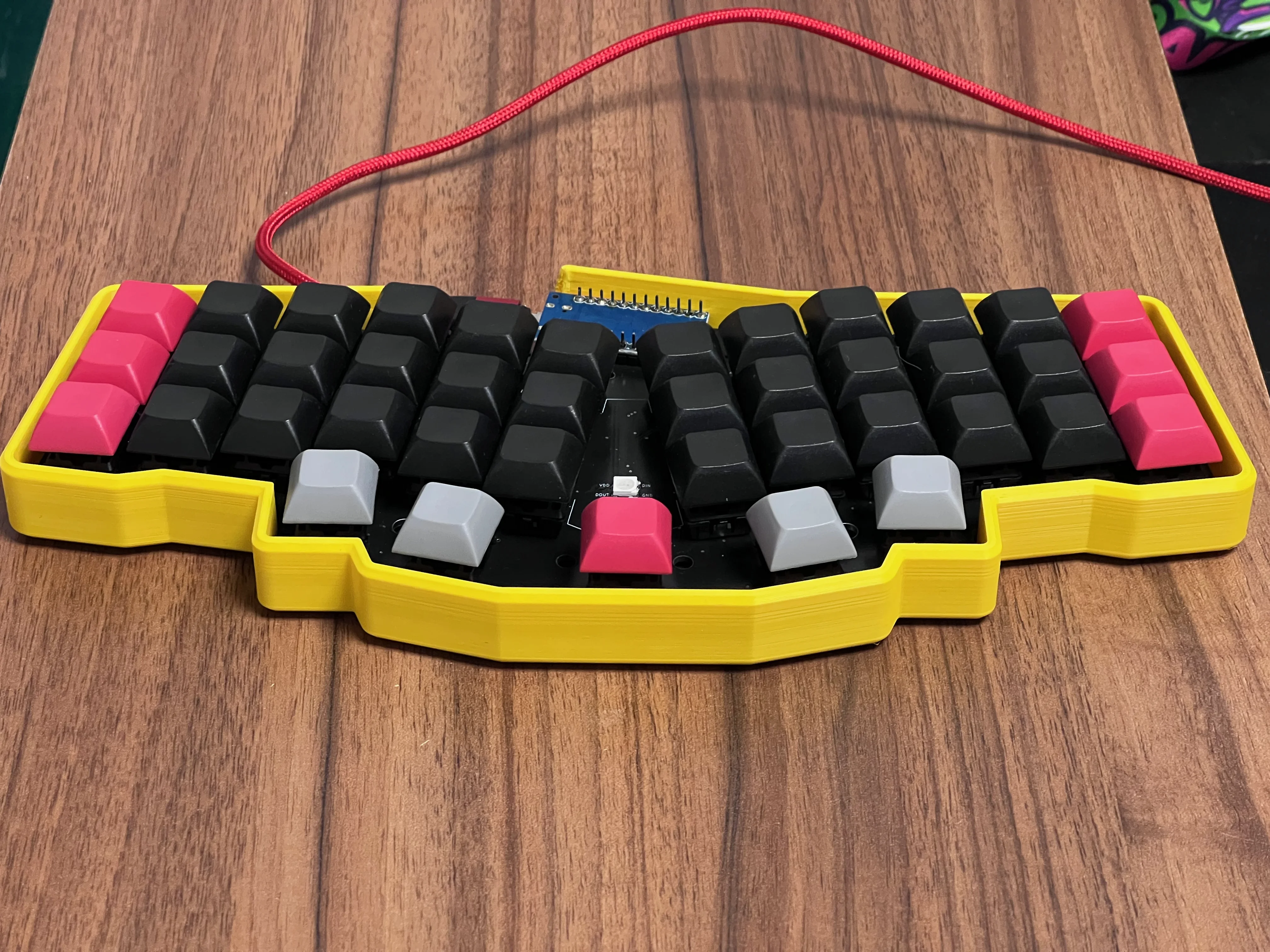
Ergonomic keyboards are not only about being “ergonomic” on paper. They are about what is best for you in real daily use.
Even the best ergonomic keyboard is useless if it is not used.
What if you want a very portable, small, ergonomic keyboard, but you do not want to handle two halves of a split keyboard, cables between them, and the small ritual of positioning everything every time? What if you just want one piece that you can take from desk to desk and use without thinking too much?
In this category only two keyboards come immediately to my mind: Reviung41 and Atreus.
Today I want to focus on the first one and answer a practical question: is Reviung41 a good keyboard, and is it worth considering as a daily driver?
To answer that, I recently switched my office Ferris Sweep to Reviung41. It was not because I suddenly stopped liking split keyboards. My main keyboard is still a Dactyl Manuform style board, and I still believe true split keyboards are the strongest ergonomic option for many people.
But I wanted to build something different: a durable, portable, single-piece keyboard with hot-swap switches, LED support, and enough comfort to use every day at the office. Reviung41 supports all of this, so I built one, carried it, typed on it, and gave it a real chance instead of judging it only by photos and layout diagrams.
So this Reviung41 keyboard review is not only “specs and theory”. It is mostly my answer to a simple question: would I actually keep using it?
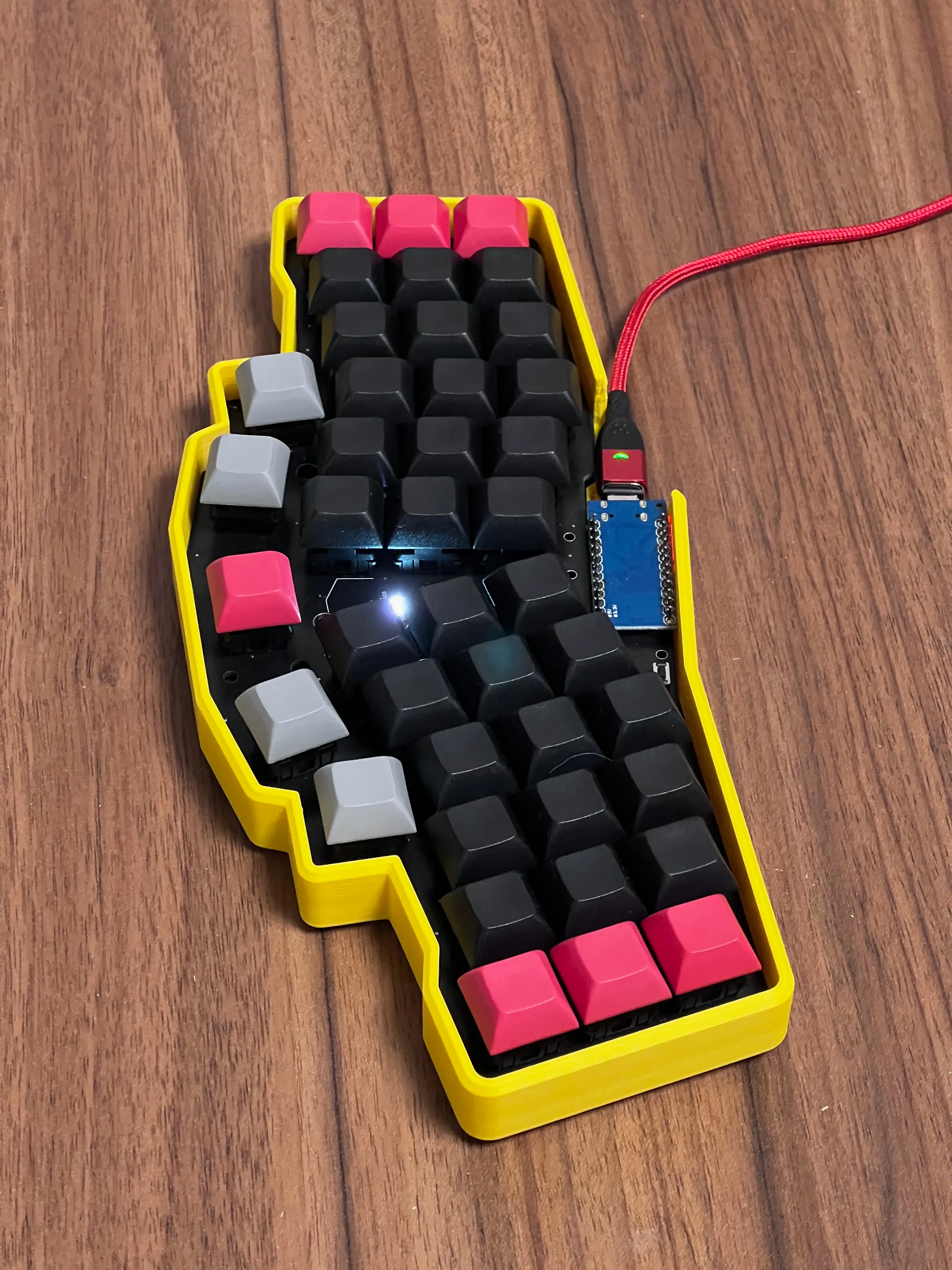
What is Reviung41?
Reviung41 is a compact, 41-key, column-staggered, semi-split keyboard from the open-source REVIUNG project.
That sounds technical, so in normal language:
- it has fewer keys than a standard keyboard
- it uses vertical finger columns instead of classic row staggering
- it keeps both hands on one physical piece
- it angles the left and right zones to behave a little more like a split keyboard
- it expects you to use layers for numbers, symbols, navigation, and function keys
This is why Reviung41 caught my attention. It is not a normal compact keyboard. It is not a full split either. It sits in the middle, in the same family I described in Semi-Split Keyboards.
For many people, this middle ground is exactly the point.
A true split gives you more freedom: width, angle, tenting, shoulder alignment. But it also gives you more things to manage. Reviung41 removes that setup friction. You put one keyboard on the desk and start typing. Sometimes that is exactly what I want, especially in the office.
That simplicity matters. Ergonomics that stays in a drawer does not help anyone.
Technical specifications
Reviung41 can be built in different variants, so the exact specification depends on the PCB and parts you choose. I will describe it through my build: a hot-swap MX version with LEDs and a 3D printed case.
Important specs:
- Number of keys: 41
- Layout: angled column-staggered semi-split layout
- Thumb keys: 5 keys in the center area, with optional 2u middle key depending on build
- Switch support: Cherry MX compatible switches
- PCB options: soldered or hot-swap, depending on version
- Firmware: usually QMK for wired builds
- Wireless possibility: possible with ZMK-compatible controller choices, depending on build
- Controller: commonly Pro Micro or compatible controller
- Case options: sandwich/hamburger case, 3D printed case, custom DIY cases
- Extra features: LED support on supported PCB versions
In short, Reviung41 is a DIY-friendly ergonomic keyboard. You can build it quite simply, or you can make it very personal with switch choice, case, controller, LEDs, keycaps, and firmware.
This is one of the reasons I like open keyboard projects. You are not only buying a product. You are slowly shaping a tool for your own hands.
Build and quality
My goal for this build was simple:
A durable, portable, single-piece keyboard that I can easily throw into a backpack, but still comfortable enough to be the only keyboard in my office desk setup.
To meet this goal I chose my favorite Cherry MX Brown switches. I know Browns are not the most exciting answer in the mechanical keyboard world, but they work well for me, and that matters more than fashion. You can read more about switches in Cherry MX Switches Explained.
I also printed a yellow case for the PCB. It is not subtle, but I like that. Because I normally use my right thumb for Space, not the middle thumb key, I decided to keep the center key as 1u and give it one simple job: turning the light on and off.
One small build detail that helped the feel: I glued the PCB to the case with 3 mm foam. This reduced empty resonance under the PCB and made the keyboard feel more solid. It is not a magic acoustic mod, but on a small plastic case it made the board nicer to type on. Without it, the build felt a little more hollow than I wanted.
SMD soldering
Reviung41 can be a more demanding build than simple through-hole keyboards.
On my PCB I had to solder:
- SMD diodes
- hot-swap sockets
- WS2812B SMD LEDs
- Pro Micro controller
- reset button
The Pro Micro and reset button are through-hole parts, but the diodes, sockets, and LEDs are surface-mount components. The SMD diodes are tiny. I mean very tiny. This is the part where good light, tweezers, and patience matter more than confidence.
On Picture below there is T4 Diode next to my finger:
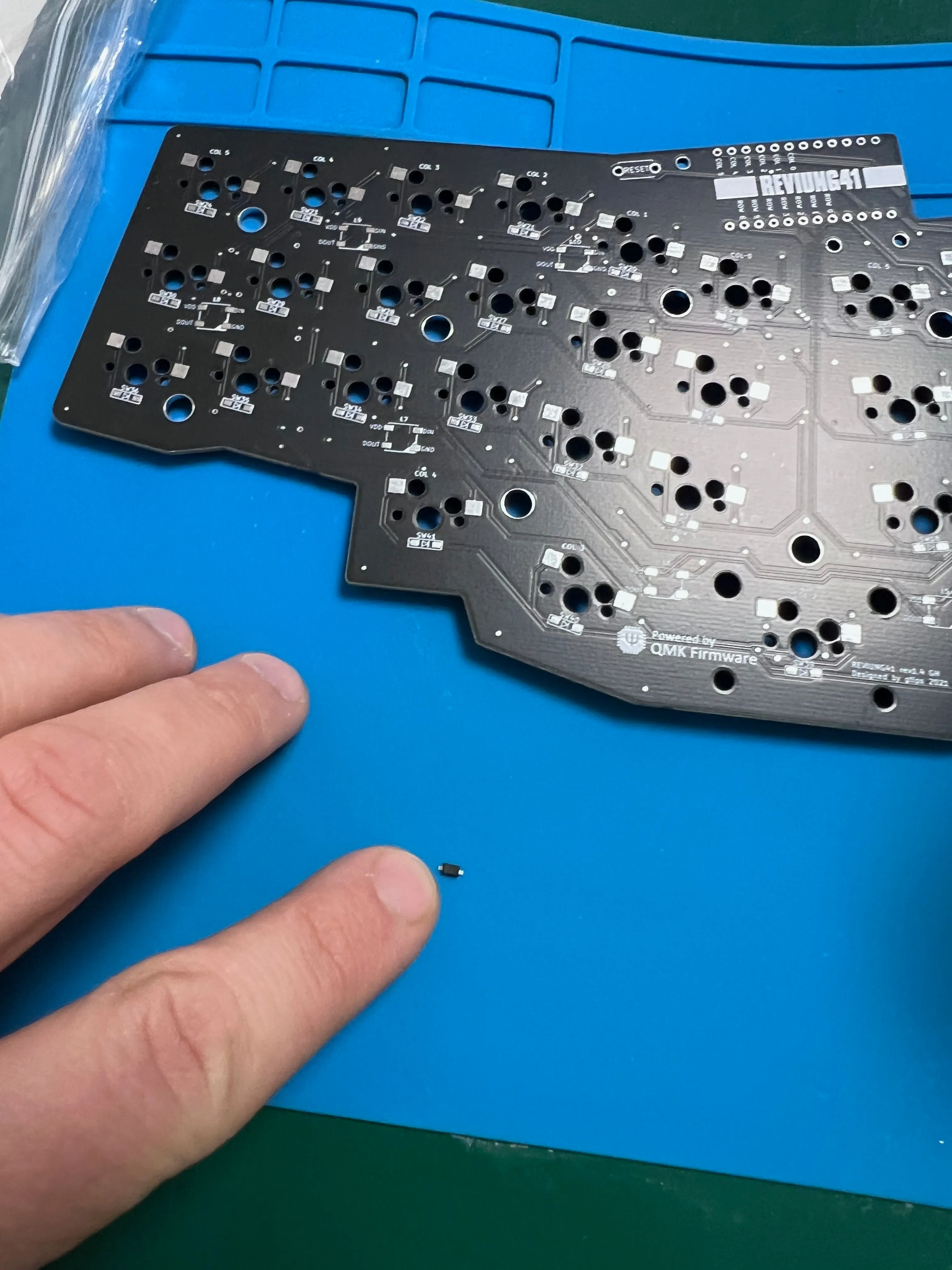
If you are new to soldering, Reviung41 is not impossible, but it is not the easiest first keyboard either. The basic method is simple: put solder on one pad, hold the diode in place, heat that pad until the diode sticks, then solder the second side. After a few diodes your hands understand the movement, but the first ones can be annoying.
Still, this build requires patience.
For me it was fun because it was my first SMD keyboard with LEDs and hot-swap sockets. It had the right amount of challenge: not frustrating, but enough to feel that I learned something. When the LEDs finally worked, that was a small but very satisfying moment.
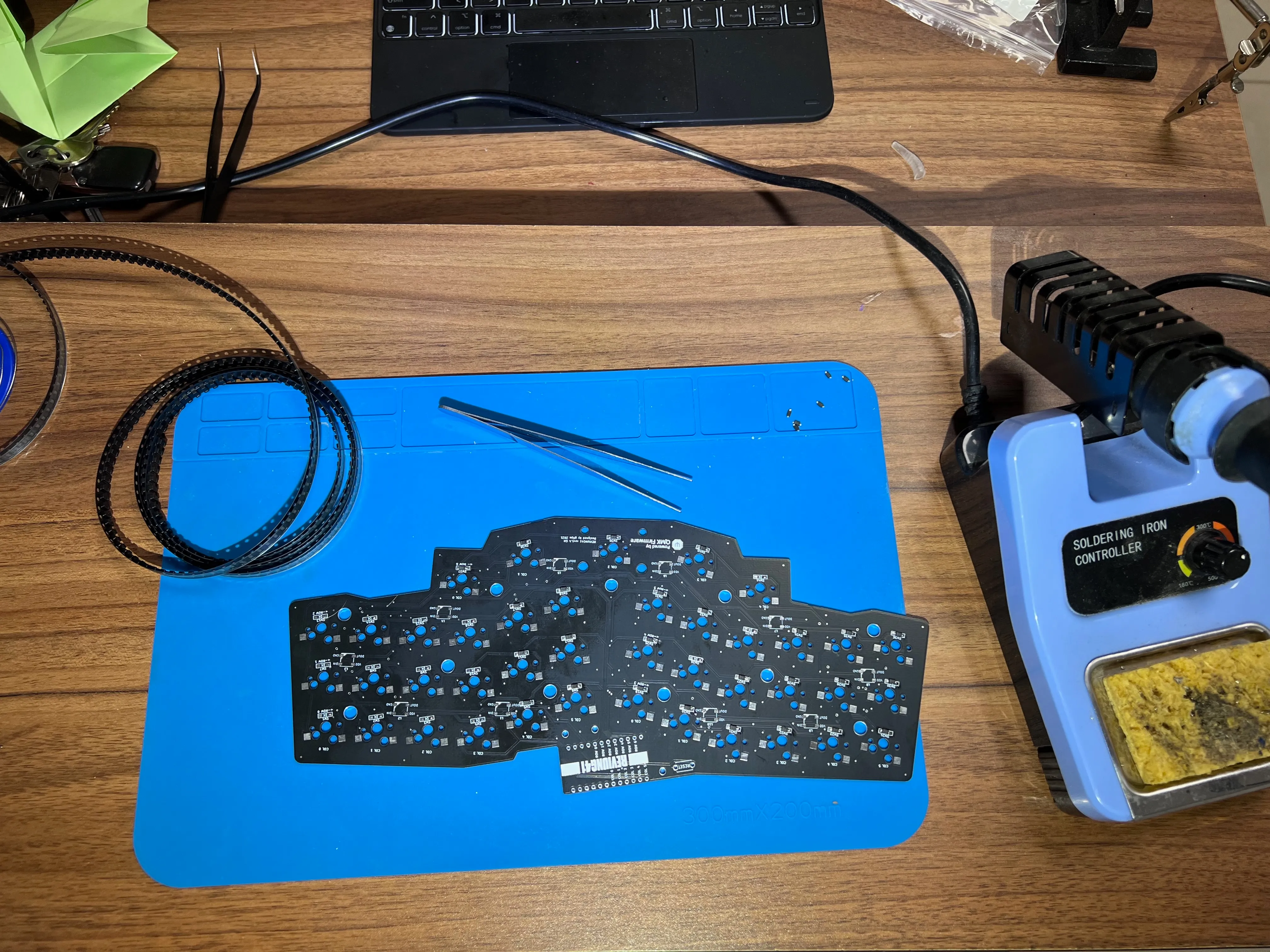
If you want the easiest first DIY keyboard, a through-hole board like Let’s Split may be friendlier. If you already built one or two keyboards, Reviung41 is a very satisfying project.
Layout and ergonomics
Semi-split shape is the main reason to care
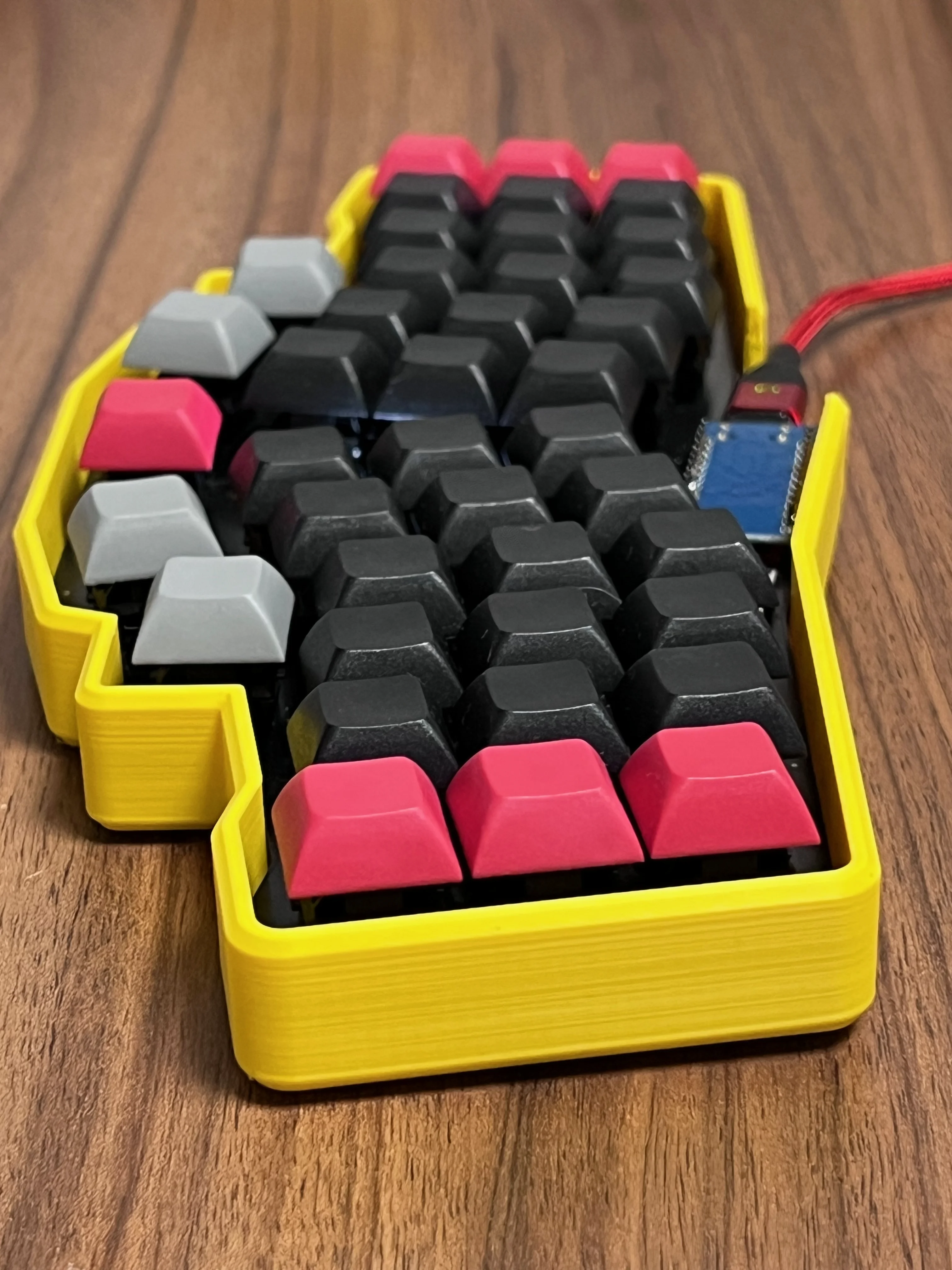
The biggest ergonomic value of Reviung41 is not that it has 41 keys. It is the shape. This is also the thing you understand better when the keyboard is actually on the desk, not when you only look at the PCB render.
On a standard keyboard, both hands are forced into one flat rectangle. The wrists often bend inward, the shoulders close slightly, and the fingers travel diagonally because of traditional row staggering.
Reviung41 improves this in a few ways:
- the left and right zones are visually and physically separated
- the hand zones are angled outward
- the layout discourages cross-hand typing
- the column stagger better follows finger length
This does not make Reviung41 equal to a true split keyboard. You cannot place the halves at shoulder width. You cannot rotate each half independently. You cannot tent each side properly unless you build some custom solution.
But compared with a standard compact keyboard, the improvement is real. My wrists do not feel as forced toward the center, and the keyboard quietly pushes me into cleaner hand zones.
Column stagger feels logical
Reviung41 uses a column-staggered layout, which means keys are arranged around finger movement instead of typewriter history. I wrote more about this idea in Column Staggered Keyboards.
The practical effect is simple: fingers move more naturally up and down, with fewer weird diagonal reaches. It is not dramatic after five minutes, but after longer typing sessions it starts to make sense.
If you already use column-staggered boards like Ferris Sweep, Corne, or many Dactyl variants, Reviung41 will feel familiar quickly. If you come from a normal keyboard, it may feel strange for the first days, but the logic appears fast.
That is usually my favorite moment with ergonomic keyboards: the layout looks unusual, then suddenly your fingers stop arguing with it. Reviung41 gave me that feeling quite quickly because I already use similar layouts.
Thumb keys are useful, but not perfect
Reviung41 gives you five central thumb keys. This is very useful because compact keyboards live or die by thumb behavior. Space, Backspace, Enter, layers, Escape, modifiers - if these are badly placed, the keyboard becomes tiring.
I like the thumb area on Reviung41, but I would not call it a true thumb cluster like on a Dactyl Manuform. It is still a flat board. The thumbs get more responsibility, but they do not get a sculpted well. So yes, it is useful, but it is not the same type of comfort.
For my layout, the right thumb handles Space, and the center key controls lighting. Other people may prefer a 2u center key or put a layer key there. This is exactly why programmability matters: the hardware gives you the shape, but the firmware makes it yours.
Firmware and configuration
For a wired build, Reviung41 is typically a QMK keyboard. That means you can customize layers, thumb keys, symbols, navigation, macros, combos, and lighting behavior.
This is important because 41 keys are not enough for a normal keyboard layout without layers. Or, more honestly: you can try, but you will quickly start missing numbers, arrows, brackets, and a few everyday shortcuts.
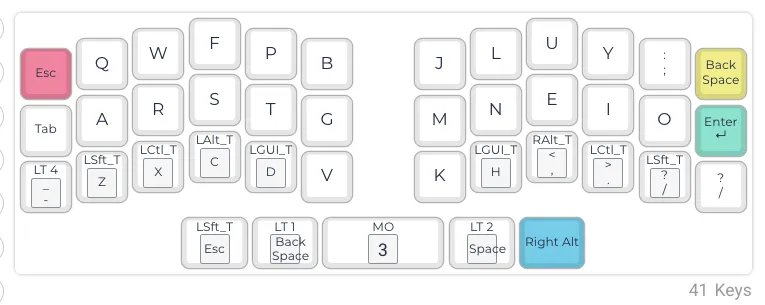
Of course, I use Colemak Mod-DH on Reviung41, the same as on my other keyboards. If you are curious why I moved away from QWERTY, I wrote more about it in QWERTY vs Colemak. This is important for me because I do not want to learn a completely different keyboard every time I switch hardware. I already changed enough in my typing life.
Below you can see my first Reviung41 layer. It is my Colemak Mod-DH base layer and the starting point for the rest of the QMK configuration. If you want to get json file with my keymap go to next chapter!
My suggestion is similar: keep your core layout as consistent as possible across all keyboards. If you use Reviung41, Ferris Sweep, Dactyl Manuform, or another ergonomic keyboard, your base typing layer, symbols, navigation, and thumb logic should feel almost the same. Then you only adjust small details to the physical shape of the keyboard.
This makes switching boards much easier. The keyboard can change, but your muscle memory stays mostly intact. For me this is the difference between “nice keyboard, but tiring” and “I can actually work on this today”.
My advice is also the same as with other compact boards: do not try to be clever on day one.
Start with a layout that lets you work:
- one base typing layer
- one number and symbol layer
- one navigation/function layer
- comfortable thumb keys for Space, Enter, Backspace, and layer access
Then improve slowly.
The mistake is to design a perfect theoretical layout before you type real work on it. The better approach is to start from your existing layout, use the keyboard for a week, notice what hurts or slows you down, then make small changes.
That is the real power of QMK. Not complexity. Consistency and iteration.
External reference:
Get my Reviung41 QMK layout
If you are building or configuring your own Reviung41, you can use my layout as a starting point. You need to download my json file and upload it to Config QMK
Enter your email below and get my personal Colemak Mod-DH Reviung41 QMK layout. You can unsubscribe anytime.
Daily use
Typing and office work
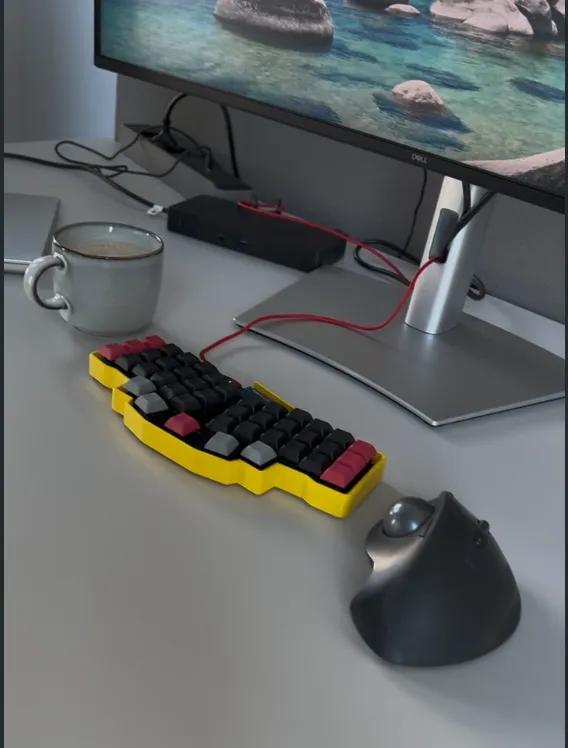
As an office daily driver, Reviung41 makes a lot of sense. This is where I like it most.
It is small enough to keep the mouse closer. It is one piece, so I can move it quickly. It does not require me to align two halves every morning. And because it has more keys than my 34-key Ferris Sweep, it gives a little more room for a comfortable office layout. That extra room is not huge, but in daily work it is noticeable.
The learning curve is still there. You need layers. You need to trust thumb keys. You need to stop expecting a number row.
But it is not as extreme as going straight to 34 keys.
For writing, emails, browsing, and general development work, Reviung41 feels practical. I would not call it plug-and-play for everyone, but I also would not call it niche only for keyboard maximalists. It is somewhere in between, and I think this is why I enjoy it.
Programming
For programming, the important question is symbols.
Brackets, braces, arrows, equals, slash, pipe, numbers, function keys - all of this needs a home. On Reviung41, this means layers must be designed intentionally.
Once symbols are placed well, programming is comfortable. The compact shape keeps hands stable, and the column stagger makes typing feel clean. But if your symbol layer is chaotic, the keyboard will punish you quickly. This is not a keyboard where you can ignore your keymap.
This is why I see Reviung41 as a good board for programmers who are willing to customize. If you want a compact ergonomic keyboard and you enjoy tuning your layout, it can be excellent. If you want to connect it and never think about firmware, you may be happier with something larger.
Portability
This is one of Reviung41’s strongest points.
A split keyboard may be more ergonomic at the desk, but it is less convenient to carry. You need to protect two halves, maybe carry a cable, and then position them every time.
Reviung41 is one piece. Put it in a bag, take it out, start typing. This sounds boring, but boring is sometimes the feature.
That sounds like a small advantage, but in real life it decides whether you actually bring the keyboard with you. And again: the keyboard you use is better than the theoretically perfect keyboard left at home. I learned this the hard way with setups that were excellent, but too annoying to move often.
Pros
- Strong ergonomic improvement over standard compact keyboards thanks to semi-split shape and column stagger.
- Very portable because it stays in one piece and does not need split keyboard setup.
- 41 keys are compact but still practical, especially compared with more extreme 34-key boards.
- QMK support makes the layout highly customizable.
- Hot-swap and LED builds are possible, which makes the board more fun and easier to tune.
- Good DIY project if you want to learn SMD soldering.
Cons
- Not as adjustable as a true split keyboard. Fixed width and fixed angle are the main ergonomic limits.
- No real tenting by default, unless you create a custom case or stand.
- Layers are required, so beginners need patience.
- SMD soldering can be challenging, especially the tiny diodes and LEDs.
- Thumb cluster is useful but flat, not as comfortable as sculpted thumb wells on boards like Dactyl Manuform.
Who is Reviung41 for?
I would recommend Reviung41 to someone who:
- wants a compact ergonomic keyboard in one piece
- likes the idea of semi-split keyboards
- types a lot but does not want to manage two separate halves
- is comfortable with layers or willing to learn them
- wants a DIY keyboard with QMK, LEDs, hot-swap options, and case customization
- needs something portable for office, travel, or laptop work
I would be more careful if you:
- want maximum ergonomic adjustability
- need tenting and shoulder-width placement
- dislike layers
- want a beginner build with only easy through-hole soldering
- want a keyboard that feels almost like a standard layout
So, is Reviung41 a good first ergonomic keyboard?
Yes, but only for the right beginner.
If someone wants the easiest transition, I would probably recommend a larger split or something with a more familiar key count. But if someone already understands that ergonomic keyboards require adaptation, Reviung41 can be a very rewarding first step. It is small, but it is not silly-small.
EKI score (Ergonomic Keyboard Index)
I compare keyboards using my Ergonomic Keyboard Index (EKI): a 0-20 scoring framework for ergonomics, practicality, portability, and buildability.
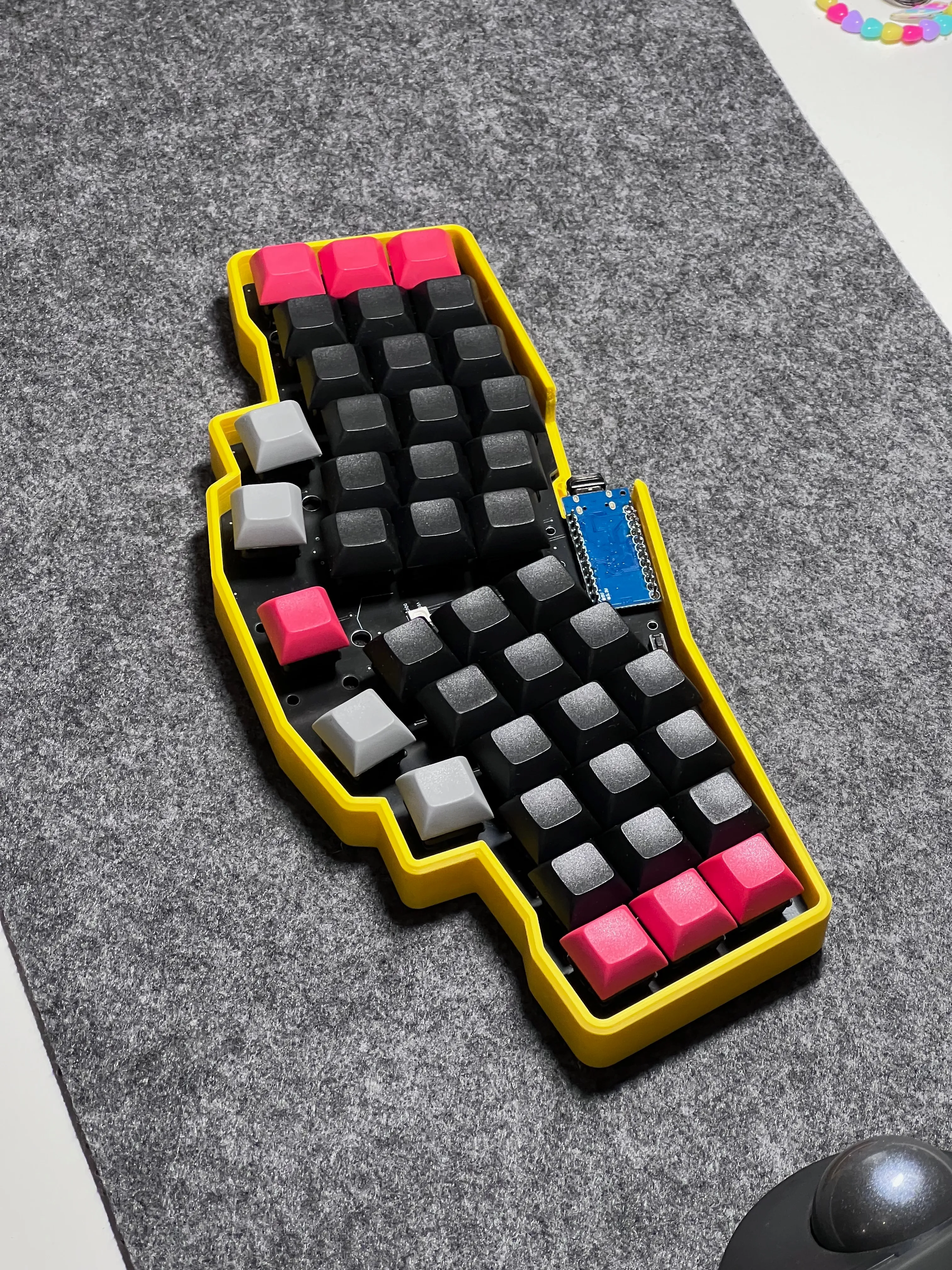
Here is how I would score my Reviung41 build.
Core Ergonomics (8.5/12)
- Programmability: 1/1 - QMK gives full layout control
- Palm Stability: 2/2 - compact layout keeps hands anchored
- Columnar Layout: 2/2 - clear column-based layout
- Column Staggering Quality: 1/1 - shaped around finger lengths
- Concavity: 0/1 - flat board
- Thumb Wells: 0.5/1 - useful thumb keys, but no sculpted thumb well
- Split Design: 1/2 - semi-split, not independently adjustable
- Tenting Support: 0/1 - no default tenting
- Switch Profile: 1/1 - mechanical MX-style switches
Practicality & Portability (4.5/5)
- Compactness: 2/2 - very compact while still usable
- Portability / Backpack Readiness: 1/1 - one-piece board is easy to carry
- Wrist-Rest Independence: 0.5/1 - usable without wrist rests, but build height matters
- Hot-Swap Switch Support: 1/1 - supported in my build/version
Buildability (2/3)
- SMD PCB: 2/3 - buildable and fun, but harder than through-hole for beginners
Final EKI score: 15/20.
That score fits my experience. Reviung41 is not trying to beat a fully split, tented, sculpted keyboard on pure ergonomics. My Dactyl-style board still wins when I only care about comfort at the desk. Reviung41 wins when I also care about carrying it, moving it, and actually using it in more places.
And that balance is very strong.
Final verdict
Reviung41 is a keyboard for people who understand that ergonomics is not only a list of features. It is also a question of what you will actually use every day.
For me, this board makes sense because it is compact, portable, and clearly more ergonomic than a normal small keyboard. The semi-split shape improves hand position. The column stagger improves finger travel. The 41-key layout is small, but still practical with a good keymap.
It is not perfect. A true split still gives better adjustability. A larger keyboard gives an easier transition. A sculpted board gives more support. I would not sell my other ergonomic keyboards because of Reviung41.
But as a portable semi-split ergonomic keyboard, Reviung41 is easy to recommend.
If you want one small keyboard that you can build, customize, carry, and actually use, Reviung41 deserves a serious look. For me, it earned its place as an office keyboard, and that is already a good result.
External references:
Thanks for reading!
Bartosz