I’m a developer who also codes for fun after work. That sounds nice until you add the hours: often around 10 hours a day at a keyboard. I took care of my back with a decent chair. The problems came from somewhere else.
My fingers started to hurt. Writing even a few sentences became uncomfortable. Constant mouse use pushed one shoulder forward. That was the moment I stopped treating hand discomfort as “just tiredness after a long sprint”.
That discomfort belongs to a bigger topic: RSI — Repetitive Strain Injury.
In this post I want to explain RSI the way I wish someone had explained it to me earlier. Not as a medical textbook. As a practical map for people who type for a living: what RSI is, how it usually builds up, what I watch for in my own hands, and what actually helped me reduce the risk — habits first, then hardware.
I’m not a doctor. This is practical ergonomics from someone who types too much, not medical advice. If you have numbness, weakness, night pain, or symptoms that refuse to go away, talk to a medical professional.
What is RSI (Repetitive Strain Injury)?
RSI is a broad name for pain or dysfunction that shows up when the same movements, postures, and force keep stacking up without enough recovery. For keyboard users that usually means wrists, forearms, elbows, fingers, thumbs — and often shoulders or neck as well, because typing is not only a finger activity.
It is not one single disease. Two people can both say “I have RSI” and describe completely different things. One has burning forearms after long coding days. Another gets thumb pain from the mouse. Someone else wakes up with stiff fingers and blames the laptop.
What they share is overload: too much repetition, awkward angles, too much force, not enough rest.
RSI vs carpal tunnel
People mix these up all the time. I did too.
- RSI is the wider category — overuse and strain in many possible tissues.
- Carpal tunnel syndrome is more specific: compression of the median nerve at the wrist.
If you get numbness/tingling in specific fingers, especially at night, don’t shrug it off as “normal programmer wrists”. That pattern deserves attention.
Useful starting points:
How RSI sneaks up on programmers
Keyboard injuries rarely arrive with a dramatic snap. There is no single keystroke you can blame.
It starts quieter. After a long day your forearms feel hot. You shake your hands, open and close your fists a few times, and forget about it. A week later the wrist feels weird in the morning. You blame the mouse. Then the chair. Then the fact that you stayed late three nights in a row.
Rest helps, so it feels harmless. That is the trap. Early RSI symptoms often come and go. Because they come and go, you delay changing anything.
I work in a large IT company. Almost everyone there lives in front of a screen. When I started asking people about typing and hand pain, the answers were depressingly familiar: “my wrists always hurt a bit”, “my forearms are just tight”, “that’s normal in our job”. Common does not mean harmless.
One keystroke is tiny. Thousands of them per hour, plus mouse clicks, plus phone use in the evening, is not tiny.
RSI stages I watch for
This is not a clinical scale. It is a simple pattern I use for myself — and when friends ask why their hands feel “weird after coding”.
Stage 0: warning signs
- stiffness after long sessions
- mild discomfort that disappears overnight
- “hot” forearms after an intense day
- you notice you hit keys harder when you are stressed
This is the best moment to act. Small changes still work well here.
Stage 1: intermittent pain
- discomfort appears while typing, then fades with rest
- you stretch randomly without a plan
- you keep changing hand position looking for relief
- you start blaming tools one by one: mouse, keyboard, chair
I lived here longer than I should have. I kept hoping the next weekend would “reset” everything.
Stage 2: persistent symptoms
- tightness or pain lasts into the next day
- your comfortable typing window gets shorter
- you avoid certain shortcuts or key combos
- phone use, gaming, or carrying bags also aggravate it
This is where productivity starts to feel fragile. You still work, but you work around your hands.
Stage 3: nerve-like symptoms / functional limits
- tingling or numbness
- weakness, dropping things, loss of fine control
- pain that wakes you at night
- symptoms that stay even when you rest
If this is you: stop treating it as a productivity problem. Get help. Pushing through “hero mode” is a bad strategy for tendons and nerves.
Prevention that actually helped me
Ergonomics is not a product you buy once. It is a system: habits, desk, keyboard, mouse, and recovery.
You can own an excellent keyboard and still wreck your hands if you type with lifted wrists, crush the mouse, never take breaks, and sleep badly for weeks. I know, because improving hardware alone was not enough for me.
1) Fix the habits before you buy anything
After my fingers started hurting, I recorded myself while working. That short video was uncomfortable to watch, but useful.
I saw two big issues:
- bad typing habits — too few fingers, wrong finger-to-key assignment, spacebar with the index finger
- constant reaching for the mouse
Both are covered in more detail in Bad Habits of Typing. If you skip one section of this post, don’t skip that one.
I also learned proper touch typing later than I should have. Speed is not the point. Clean finger travel and less compensation from wrists and shoulders is the point.
2) Cut continuous typing time
The problem is often not “I typed today”. It is “I typed for two hours without changing position”.
I aim for a short reset every 20–30 minutes: stand up, shake the hands out, look away from the screen. Thirty to sixty seconds is enough. Long breaks once a day help less than frequent micro-breaks.
3) Keep wrists closer to neutral
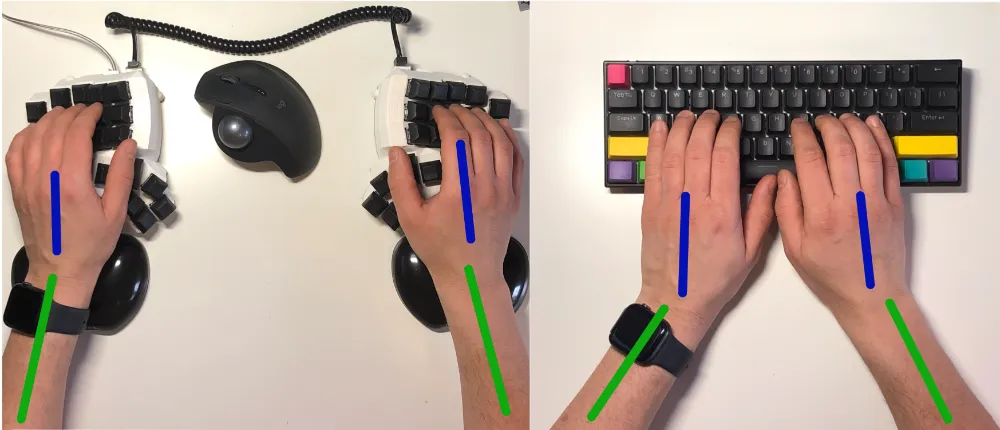
For many people the biggest pain generator is wrist extension (bent upward) and deviation (bent sideways toward the little finger).
If you want the visual, look at the cover image of this post, and then read:
Wrist rests are not automatically good or bad. Height and how you use them matter. Resting hard on them while typing can create a new problem.
4) Type lighter
A lot of “keyboard pain” is simply too much force, repeated thousands of times.
Try pressing keys as if the board is fragile. Most people bottom out less aggressively once they notice how hard they hit. Softer switches can help, but lighter technique helps even on a stiff board. More on switches here: Cherry MX Red vs Brown vs Blue.
5) Reduce mouse load
Programmers often talk about “keyboard RSI” or “mouse RSI” as if they were separate worlds. Your hands do not care about that distinction. They care about total load.
Practical moves that helped me:
- learn a few shortcuts that replace mouse travel (one per week is enough)
- keep the mouse close — no long reaches across the desk
- move navigation and window management onto the keyboard when you can
That last point is one reason I care so much about programmable layouts on boards like Ferris Sweep and Reviung41.
How ergonomic keyboards help with RSI risk
Now the hardware part — the part this blog lives for.
An ergonomic keyboard will not magically cure RSI. It can remove mechanical stressors that a flat rectangular board forces on you every day. That still matters.
If you want the full overview of features first, start with What Are Ergonomic Keyboards?.
Split keyboards
A split keyboard lets each half sit where your hands naturally want to be. Wrists usually end up straighter. Shoulders open a bit. The classic “funnel” posture of a standard keyboard gets weaker.
This was a big deal for me. My main board at home is still a Dactyl Manuform-style split. At the office I have used Ferris Sweep and later Reviung41 when I wanted something easier to carry.
Tenting
A flat keyboard forces the forearms to rotate palm-down. Mild tenting can feel more natural for some people. Not everyone needs it. If your forearms feel twisted at the desk, try it before you decide it is “only for enthusiasts”.
Ortholinear and column stagger
On a normal keyboard, fingers travel on diagonal paths because of row stagger. Ortholinear and column-staggered layouts push travel closer to vertical. Over thousands of keystrokes, awkward reaches add up.
Programmability
This one is underrated for RSI prevention.
With QMK-style firmware you can bring Backspace, Enter, arrows, and modifiers closer to home. Fewer pinky stretches. Fewer big reaches. More stable hand position.
If you go small with layers, do it carefully — I wrote about that trade-off in 34 Keys as a Daily Driver for Developers.
Low profile
Lower boards can reduce wrist extension because your hands do not have to climb up to the keys as much. That is one reason many people like low-profile splits for long sessions, sometimes even without wrist rests.
A simple plan if your hands already complain
If you want something you can start today:
- Record 30 seconds of yourself typing. Watch the wrists and the force.
- Fix the biggest thing you see — usually wrist angle or hitting too hard.
- Add micro-breaks for one week. Use a timer. Don’t rely on memory.
- Clean up typing technique and cut unnecessary mouse travel.
- Only then consider a hardware change: split, tenting, better layout.
If you want a beginner-friendly hardware step, I still recommend split + ortholinear as a strong first combination:
Closing thoughts
RSI is not a personal failure and it is not “just getting older”. For people who type all day, it is a predictable risk when workload, posture, and recovery drift out of balance.
I ignored early signals longer than I should have. Fingers hurt. Shoulder shifted. Coding for fun stopped being fun. Fixing that took time: better typing, less mouse, micro-breaks, and eventually keyboards that do not force my wrists into a funnel all day.
You do not need to change everything this week. Change one thing, notice what happens, then change the next.
Thanks for reading!
Bartosz