Colemak is an alternative keyboard layout designed for efficient touch typing in English. It puts frequently used letters under your resting fingers, with the aim of reducing movement while you type. Shai Coleman released it in 2006. You can use it on an ordinary keyboard by changing the layout in software. See the official Colemak introduction and FAQ.
What does the Colemak layout look like?
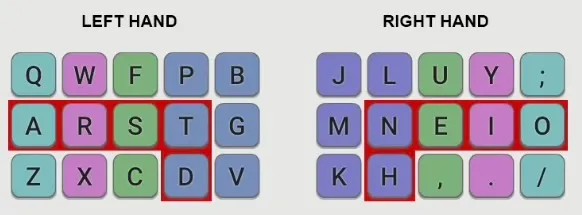
The middle letter row, called the home row, reads A R S T D H N E I O. With standard touch-typing technique, your fingers rest on A R S T and N E I O. Common English letters such as E, T, N and S are right there, instead of requiring a reach to another row.
Colemak also takes English bigrams into account: pairs of consecutive letters, such as TH, HE and IN. Letter frequency tells us which keys we press most often; bigrams tell us which movements we repeat between them. The layout aims to reduce awkward sequences, especially frequent pairs typed with the same finger.
How is Colemak different from QWERTY?
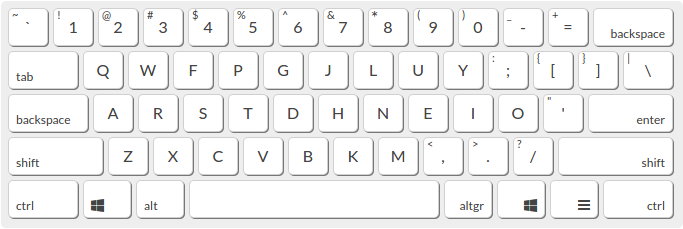
Standard Colemak changes 17 keys compared with QWERTY, while keeping familiar shortcuts such as Ctrl+Z, Ctrl+X, Ctrl+C and Ctrl+V in place. The diagram above also shows the original Colemak mapping of Caps Lock to Backspace. These details are explained in the Colemak FAQ.
The practical trade-off is learning new letter positions. Your typing will be slower at first, and the time needed to feel comfortable varies. A different layout does not automatically make you a faster typist.
For a closer look at letter placement and heat maps, read my QWERTY vs Colemak comparison.
What is Colemak-DH?
Colemak-DH, also called Colemak Mod-DH, is a variation that moves a few keys, particularly D and H, to reduce reaching toward the middle columns. It has versions for standard and matrix-style keyboards. The Mod-DH project shows the differences.
I use Colemak Mod-DH on my ergonomic keyboards. The diagram at the top of this article shows standard Colemak, so it differs from my personal layouts.
Do you need a new keyboard?
No. You can learn Colemak on your existing keyboard. macOS, Linux and Windows 11 from version 24H2 include it; older Windows versions need an installation. The official Colemak site links to setup instructions.
You can leave the keycaps where they are and keep a layout diagram near your screen for reference.
How do you start learning?
Start with the home row and short practice sessions. Give yourself time to learn the positions before chasing speed.
My own approach was to learn Colemak on a separate ergonomic keyboard and keep a QWERTY keyboard nearby for urgent work. I describe the process, including the attempts that did not work for me, in Switching from QWERTY to Colemak.
Thanks for reading!
Bartosz